Download Page
How to Download
(1.) Download the modified League Of Legends client here: Download
(2.) Download the League Of Legends Lobby from here: Download
(3.) Extract both files, then go to ls4-launcher-master\dist_electron and run LeagueS4 Launcher Setup 0.0.0.exe to install.
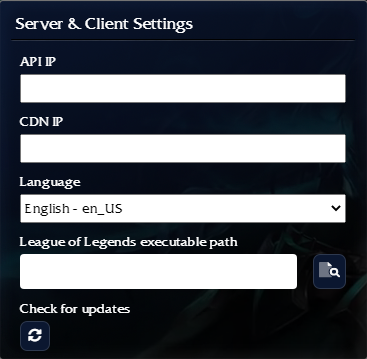
(4.) Open LeagueS4 Launcher, click the cogwheel, and enter the following details. Click any row to quickly copy it:
API IP:
client.baftes.com:3004
CDN IP:
lol.baftes.com:80
LoL Executable Path:
League of Legends_UNPACKED\League-of-Legends-4-20\RADS\solutions\lol_game_client_sln\releases\0.0.1.68\deploy\League of Legends.exe
(5.) After entering all information, click Register to create an account. Then you can create a custom match to play with friends.